
🔄 Multi Converter Tool
ℹ️ How to Use
Network Tools
The Ultimate Hex to ASCII, Decimal, Binary & Base64 Converter Online Tool
In today’s digital world, developers and IT professionals frequently work with different number systems and encoding formats.
Whether you’re debugging network protocols, analyzing data packets, or converting between various formats, having a reliable hex to ascii converter is essential for your toolkit.
Professional Hex to ASCII Converter: Your Complete Solution
A hex to ascii converter is a powerful online tool that enables seamless conversion between multiple number systems and encoding formats.
This versatile converter supports bidirectional transformation between hexadecimal (HEX), ASCII text, decimal numbers, binary code, and Base64 encoding.
The tool serves as an all-in-one solution for professionals who need to quickly convert data between different formats without installing additional software or writing custom scripts.
Convert Between HEX, ASCII, Decimal, Binary, and Base64
Our comprehensive conversion tool supports all major format transformations:
- Convert hex to binary – Transform hexadecimal values to binary representation
- Convert decimal to hex – Change decimal numbers to hexadecimal format
- ASCII to hex converter – Convert text characters to hexadecimal values
- Convert hex to decimal – Transform hex values to decimal numbers
- Binary to ASCII conversion – Convert binary code to readable text
Who Benefits from This Converter Tool?
This comprehensive converter is designed for:
- Software Developers working with low-level programming and data manipulation
- Network Engineers analyzing network packets and protocols
- Cybersecurity Professionals examining encoded data and payloads
- IT Students learning about different number systems and data encoding
- System Administrators troubleshooting system logs and debugging issues
Key Features of the Hex Converter
Comprehensive Conversion Capabilities
Our advanced hex converter provides these essential conversion tools:
- Hex to decimal converter – Transform hexadecimal values to decimal numbers
- Decimal to hex converter – Convert decimal numbers to hexadecimal format
- Binary to hex converter – Change binary code to hex representation
- Hex to binary converter – Transform hex values to binary format
- ASCII to hex converter – Convert text characters to hexadecimal
- Base64 encoding and decoding capabilities
- Real-time bidirectional conversion support
Automatic Data Synchronization
When you input data in any format, the tool automatically updates all other format fields in real-time.
This synchronized approach eliminates the need for multiple conversion steps and reduces the chance of errors.
Quick Copy Functionality
Each conversion result includes a convenient copy button, allowing you to instantly copy the converted values to your clipboard for immediate use in your projects or documentation.
Step-by-Step Guide: Convert Hex to Decimal and More
Converting Text to Multiple Formats
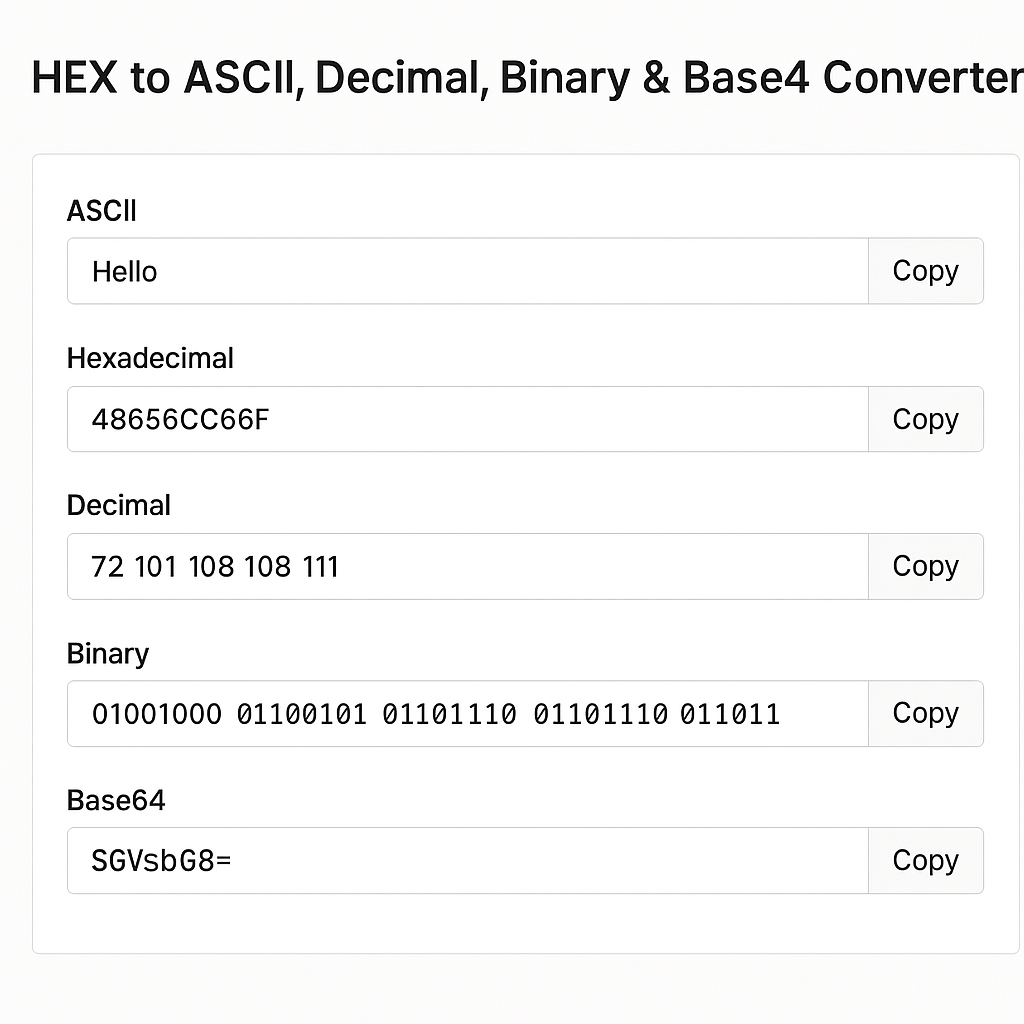
Let’s walk through a practical example of how to convert hex to decimal and other formats:
Example 1: Text to All Formats
- Enter the text “Hello” in the ASCII field
- The tool automatically generates:
- Hexadecimal: 48656C6C6F
- Decimal: 72 101 108 108 111
- Binary: 0100100001100101011011000110110001101111
- Base64: SGVsbG8=
Converting Hex to ASCII Text
Example 2: Hex to ASCII Conversion
- Input the hex value “48656C6C6F” in the hexadecimal field
- The hex to ascii converter instantly displays “Hello” in the ASCII field
- Use the copy button to grab the result for your project
Advanced Conversion Examples
Example 3: Working with Decimal Values
- To convert decimal to hex: Enter “255” in the decimal field
- Result: FF in hexadecimal
- The decimal to hex converter handles both single values and sequences
Example 4: Binary Conversion
- To convert hex to binary: Input “A1” in the hex field
- Result: 10100001 in binary format
- The hex to binary converter maintains precision for all bit patterns
Why Choose This Online Hex Converter?
No Installation Required
Unlike desktop applications, this web-based hex to decimal converter works directly in your browser.
No downloads, installations, or system requirements to worry about.
Multi-Platform Compatibility
Access the converter from any device with an internet connection – Windows, Mac, Linux, or mobile devices.
The responsive design ensures optimal performance across all platforms.
Instant Results
The real-time conversion engine processes your input immediately, making it perfect for rapid development workflows and troubleshooting scenarios.
Free and Accessible
This comprehensive conversion tool is completely free to use, with no registration requirements or usage limitations.
Real-World Applications for Developers
Network Protocol Analysis
Network engineers often encounter hexadecimal data in packet captures.
The ascii to hex converter helps decode readable text from network communications.
Programming and Development
When working with memory addresses, color codes, or binary data, developers rely on tools that can convert hex to decimal and handle multiple format conversions seamlessly.
Data Forensics
Digital forensics professionals use hex converters to analyze file headers, examine encoded data, and decode various data formats during investigations.
Educational Purposes
Students learning computer science concepts benefit from visualizing how the same data appears in different number systems and encoding formats.
Best Practices for Using the Converter
Validate Your Input
Always verify that your input data is in the correct format before conversion.
The tool provides error handling for invalid inputs.
Double-Check Critical Conversions
For production systems or critical applications, cross-verify important conversions using alternative methods or tools.
Understand the Context
Different applications may interpret the same hex values differently.
Ensure you understand the context and endianness requirements for your specific use case.
Troubleshooting Common Issues
Character Encoding Problems
If you encounter unexpected results, verify that your input text uses standard ASCII characters.
Extended characters may require specific encoding considerations.
Large Data Sets
For very large data conversions, consider breaking the data into smaller chunks to ensure optimal performance and accuracy.
Frequently Asked Questions (FAQ)
What is a hex to ASCII converter?
A hex to ascii converter is an online tool that transforms hexadecimal values into readable ASCII text characters. Hexadecimal uses base-16 notation (0-9, A-F) to represent data, while ASCII represents standard text characters. For example, the hex value “48656C6C6F” converts to the ASCII text “Hello”.
How do I convert hex to decimal?
To convert hex to decimal using this tool:
- Enter your hexadecimal value in the hex input field
- The tool automatically displays the decimal equivalent
- For example: Hex “FF” converts to decimal “255”
- Use the copy button to grab the decimal result
The hex to decimal converter handles both single hex digits and multi-digit hex strings seamlessly.
Can I use this tool to convert ASCII to hex?
Yes, this tool functions as both a hex to ascii converter and an ascii to hex converter. Simply:
- Type your text in the ASCII field
- The hexadecimal representation appears automatically
- Each ASCII character converts to its corresponding 2-digit hex value
- Copy the hex result for use in your programming projects
What is the difference between hex and binary?
Hexadecimal and binary are different number systems:
- Binary uses only 0 and 1 (base-2 system)
- Hexadecimal uses 0-9 and A-F (base-16 system)
- One hex digit represents exactly 4 binary digits
- Example: Hex “A” equals binary “1010”
Our binary to hex converter and hex to binary converter make switching between these formats effortless.
Is this hex converter tool free to use?
Yes, this comprehensive hex converter is completely free to use. There are no:
- Registration requirements
- Usage limitations
- Hidden fees or subscriptions
- Software installations needed
Access all conversion features including decimal to hex converter and convert hex to decimal functions at no cost.
Can I convert base64 to text with this tool?
Absolutely! This multi-format converter supports Base64 encoding and decoding:
- Paste your Base64 string into the Base64 field
- The tool automatically converts it to readable ASCII text
- You can also convert text to Base64 by entering it in the ASCII field
- All conversions happen in real-time with automatic synchronization
Conclusion
The hex to ascii converter tool represents an essential resource for anyone working with data conversion and multiple number systems. Its comprehensive feature set, including binary to hex converter, hex to decimal converter, and decimal to hex converter capabilities, makes it a valuable addition to any technical professional’s toolkit.
Whether you need to convert hex to decimal for mathematical calculations, convert decimal to hex for programming tasks, or convert hex to binary for system-level analysis, this all-in-one converter delivers reliable results instantly.
Bookmark this tool and share it with your colleagues to streamline your data conversion workflows. With its free access, no installation requirements, and comprehensive format support, this converter tool enhances productivity for developers, network engineers, and IT professionals worldwide.
Start using the converter today and experience the convenience of having all major data format conversions available at your fingertips!