
🛡️ Port Scanner Tool
📚 Common Port Reference Guide
🌐 Web Services
💻 Remote Access
📧 Email Services
🗄️ Database Services
📁 File Transfer
🌍 Network Services
- Common web scan: 80,443,8080,8443
- Email servers: 25,110,143,587,993,995
- Database scan: 3306,5432,1433,1521
- Full basic scan: 21,22,23,25,80,110,143,443,445,3306,3389,8080
Network Tools
Complete Online Port Scanner Guide – Check Open Ports Tool 2025
What Is a Port Scanner and Why Do You Need It?
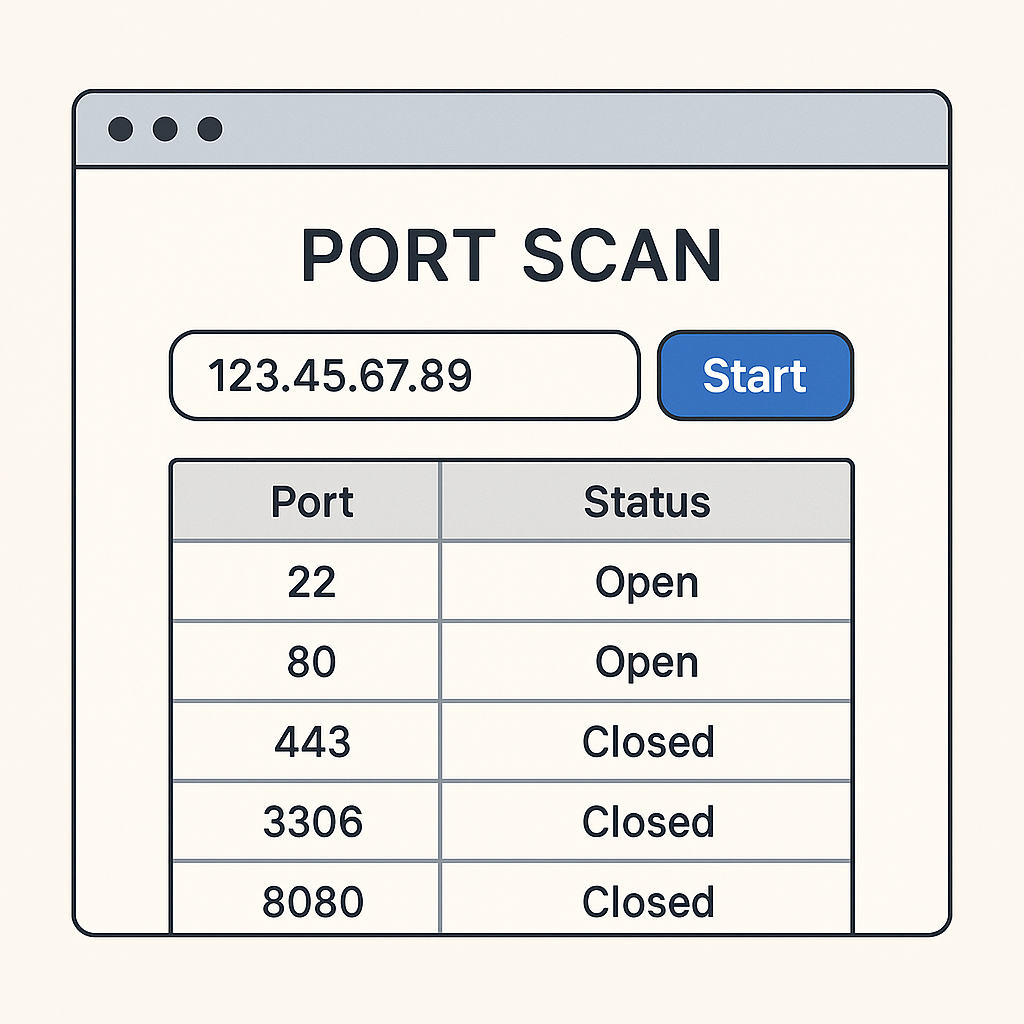
A port scanner is a powerful network security tool that probes a server or host for open ports. In today’s cybersecurity landscape, understanding how to check open ports is essential for network administrators, security professionals, and anyone concerned about their network’s security posture.
Using an online port scanner helps you identify security vulnerabilities in your network. Understanding how to utilize an online port scanner effectively can enhance your cybersecurity measures.
Employing an online port scanner is crucial for detecting unauthorized access and ensuring your system’s integrity.
There are various online port scanner tools available that can help streamline your network security audits.
Utilizing an online port scanner allows for a streamlined process in identifying vulnerabilities.
When you use an online port scanner, you’re essentially knocking on different “doors” (ports) of a target system to see which ones are open and potentially accessible. This process is fundamental to network security assessment and system administration.
Understanding Network Ports and Port Scanning
What Are Network Ports?
Network ports are virtual endpoints in an operating system that allow different applications and services to communicate over a network. Think of ports as numbered doors on a building – each door serves a specific purpose and allows access to different services.
Common Port Categories:
- Well-known ports (0-1023): Reserved for system services like HTTP (80), HTTPS (443), SSH (22)
- Registered ports (1024-49151): Used by user applications and services
- Dynamic/Private ports (49152-65535): Typically used for temporary connections
How Port Scanning Works
A port scanner online tool works by sending packets to specific ports on a target host and analyzing the responses. The scanner can determine if a port is:
Regular use of an online port scanner can provide insights into your network’s exposure and potential threats.
- Open: The port is actively accepting connections
- Closed: The port is accessible but no service is listening
- Filtered: A firewall or other security device is blocking access
Types of Port Scanners and Scanning Techniques
Online Port Scanner vs Desktop Applications
Online Port Scanner Benefits:
Understand the importance of regular scans with an online port scanner to keep your systems secure.
- No software installation required
- Accessible from any device with internet
- Always up-to-date with latest features
- Cross-platform compatibility
For optimal results, select an online port scanner with a user-friendly interface and comprehensive features.
Using an effective online port scanner can significantly enhance your overall security strategy.
Desktop Port Scanner Applications:
- More advanced features and customization
- Faster scanning capabilities
- Offline functionality
- Integration with other security tools
Popular Port Scanning Techniques
TCP Connect Scan:
- Most basic and reliable method
- Establishes full TCP connection
- Easily detected by security systems
SYN Scan (Half-open scan):
- Faster and more stealthy
- Doesn’t complete TCP handshake
- Preferred by most advanced port scanner tools
UDP Port Scanner:
- Scans UDP ports for services like DNS, DHCP
- More challenging due to UDP’s connectionless nature
- Essential for comprehensive network assessment
How to Check Open Ports: Complete Guide
Using Online Port Scanner Tools
The easiest way to check if port is open is using web-based tools:
Step 1: Enter the target IP address or hostname Step 2: Specify the port range you want to scan Step 3: Select scanning options (TCP/UDP, timeout settings) Step 4: Review the scan results and analyze findings
Check Open Ports on Different Operating Systems
How to Check Open Ports Linux
Using Netstat:
netstat -tuln
netstat -an | grep LISTEN
Using SS (modern replacement for netstat):
ss -tuln
ss -an | grep LISTEN
Using Nmap:
nmap -p- localhost
nmap -sT -O localhost
Check Open Ports Windows
Using Command Prompt:
netstat -an
netstat -an | findstr LISTENING
Using PowerShell:
Get-NetTCPConnection | Where-Object {$_.State -eq "Listen"}
Test-NetConnection -ComputerName hostname -Port 80
Check Open Ports Mac Terminal
Using Netstat:
By utilizing an online port scanner, organizations can proactively safeguard their networks from potential breaches.
netstat -an | grep LISTEN
lsof -i -P | grep LISTEN
Using Nmap (requires installation):
nmap -p 1-65535 localhost
Best Port Scanner Tools and Applications
Free Port Scanner Options
1. Nmap (Network Mapper)
- Most popular and powerful free port scanner
- Cross-platform compatibility
- Extensive scripting capabilities
- Both GUI and command-line versions
2. Advanced Port Scanner
- User-friendly Windows application
- Fast multi-threaded scanning
- Remote shutdown and wake-on-LAN features
3. Angry IP Scanner
- Simple and fast ip port scanner
- Cross-platform Java application
- Customizable scanning options
Online Port Scanner Services
Benefits of Web-Based Tools:
- No software installation required
- Regular updates and maintenance
- Accessible from any device
- Often include additional security features
Popular Online Options:
- Port scanner websites with real-time results
- Integrated security assessment tools
- Mobile-friendly interfaces
Port Scanning for Network Security
Legitimate Uses of Port Scanning
Employing an online port scanner is a proactive measure in maintaining your network’s health.
Network Administration:
Knowing how to operate an online port scanner can help you detect weaknesses before they are exploited.
- Inventory of running services
- Security compliance auditing
- Troubleshooting connectivity issues
- Performance monitoring
Security Assessment:
- Vulnerability identification
- Penetration testing
- Risk assessment
- Incident response
System Monitoring:
- Service availability checks
- Performance baseline establishment
- Change detection
- Capacity planning
Ethical Considerations and Legal Aspects
Important Guidelines:
- Only scan systems you own or have explicit permission to test
- Respect rate limits to avoid disrupting services
- Document all scanning activities
- Follow responsible disclosure practices
Legal Considerations:
- Port scanning itself is generally legal
- Unauthorized scanning may violate terms of service
- Some jurisdictions have specific cybersecurity laws
- Always obtain proper authorization
Common Port Numbers and Services
Critical Ports to Monitor
Web Services:
- Port 80 (HTTP) – Web traffic
- Port 443 (HTTPS) – Secure web traffic
- Port 8080 (HTTP Alternate) – Alternative web port
Remote Access:
- Port 22 (SSH) – Secure remote access
- Port 23 (Telnet) – Unsecured remote access
- Port 3389 (RDP) – Windows Remote Desktop
Email Services:
- Port 25 (SMTP) – Email sending
- Port 110 (POP3) – Email retrieval
- Port 143 (IMAP) – Email access
- Port 993 (IMAPS) – Secure IMAP
Database Services:
- Port 3306 (MySQL) – MySQL database
- Port 5432 (PostgreSQL) – PostgreSQL database
- Port 1433 (MSSQL) – Microsoft SQL Server
File Services:
- Port 21 (FTP) – File transfer
- Port 445 (SMB) – Windows file sharing
- Port 2049 (NFS) – Network file system
Advanced Port Scanning Techniques
Stealth Scanning Methods
SYN Stealth Scan:
- Avoids completing TCP handshake
- Reduces detection probability
- Faster than full connect scans
FIN Scan:
- Sends FIN packets to closed ports
- Effective against simple firewalls
- Platform-dependent results
NULL Scan:
- Sends packets with no flags set
- Useful for firewall evasion
- Limited effectiveness on Windows
Evasion Techniques
Fragmentation:
- Splits packets to avoid detection
- Bypasses simple packet filters
- May cause false positives
Timing Control:
- Adjusts scan speed to avoid detection
- Prevents overwhelming target systems
- Balances stealth with efficiency
Source Port Manipulation:
- Uses specific source ports
- Bypasses port-based filtering
- Mimics legitimate traffic
Interpreting Port Scan Results
Understanding Scan Output
Open Ports:
- Service is running and accepting connections
- Potential entry point for attackers
- Requires security assessment
Closed Ports:
- No service listening on the port
- Host is reachable but service unavailable
- Generally not a security concern
Filtered Ports:
- Firewall or filter blocking access
- Cannot determine if service is running
- May indicate security measures in place
Security Implications
Risk Assessment Factors:
- Service type and version
- Authentication requirements
- Encryption status
- Known vulnerabilities
Mitigation Strategies:
- Close unnecessary services
- Implement proper firewall rules
- Use strong authentication
- Keep services updated
Port Scanner for Different Platforms
Windows Port Scanner Options
Built-in Tools:
- Netstat for basic port information
- PowerShell for advanced queries
- Windows Defender Firewall logs
Third-party Applications:
- Advanced Port Scanner
- SoftPerfect Network Scanner
- Portable scanning tools
Python Port Scanner Development
Basic TCP Scanner:
import socket
from datetime import datetime

def scan_port(target, port):
    try:
        sock = socket.socket(socket.AF_INET, socket.SOCK_STREAM)
        sock.settimeout(1)
        result = sock.connect_ex((target, port))
        sock.close()
        return result == 0
    except:
        return False
Multi-threaded Scanner:
- Concurrent port scanning
- Improved performance
- Resource management
Ensure you leverage an online port scanner to keep your systems updated and secure against threats.
UDP Port Scanner Considerations
Challenges:
- Connectionless protocol nature
- Limited response information
- Higher false positive rates
Techniques:
- ICMP response analysis
- Service-specific probes
- Extended timeout values
Troubleshooting Common Issues
When Ports Appear Filtered
Possible Causes:
- Firewall blocking access
- Network ACLs in place
- Rate limiting active
- Service temporarily unavailable
Troubleshooting Steps:
- Verify firewall settings
- Check network connectivity
- Test from different locations
- Adjust scanning parameters
False Positives and Negatives
False Positives:
- Service appears open but isn’t functional
- Honeypot or deception service
- Misconfigured filtering
False Negatives:
- Open service not detected
- Aggressive rate limiting
- Scan evasion techniques
Security Best Practices
Protecting Against Port Scans
Detection Methods:
- Intrusion Detection Systems (IDS)
- Log analysis and monitoring
- Behavioral analytics
- Network traffic analysis
Prevention Strategies:
- Minimize exposed services
- Implement proper firewall rules
- Use fail2ban or similar tools
- Regular security assessments
Secure Port Management
Service Hardening:
- Disable unnecessary services
- Use non-standard ports when appropriate
- Implement proper authentication
- Enable encryption where possible
Monitoring and Maintenance:
- Regular port audits
- Service inventory management
- Vulnerability assessments
- Incident response planning
To learn more about port scanning, check out these trusted resources:
- Nmap Port Scanning Techniques
- Port Scanning in Network Security – GeeksforGeeks
- Wikipedia – Port Scanner
Frequently Asked Questions (FAQ)
1. What is the difference between an online port scanner and a desktop application?
Online port scanners run in your web browser and require no software installation. They’re convenient for quick scans but may have limitations in features and speed. Desktop applications like advanced port scanner tools offer more functionality, customization options, and faster scanning capabilities but require installation and maintenance.
2. Is it legal to use a port scanner on any system?
Port scanning is legal when performed on systems you own or have explicit permission to test. Scanning other people’s systems without authorization may violate terms of service or local cybersecurity laws. Always ensure you have proper authorization before scanning any network or system.
3. How do I check if a specific port is open on my system?
You can check if port is open using several methods:
- Windows: Use
netstat -an | findstr :PORT_NUMBERin Command Prompt - Linux/Mac: Use
netstat -tuln | grep PORT_NUMBERorss -tuln | grep PORT_NUMBER - Online tools: Use web-based port checkers for external verification
4. What’s the difference between TCP and UDP port scanning?
TCP scanning is more reliable because TCP is connection-oriented, providing clear responses (open/closed/filtered). UDP port scanner tools face more challenges because UDP is connectionless, making it harder to determine if a port is truly open or just not responding.
5. Why do some ports show as “filtered” in scan results?
“Filtered” means a firewall, router, or other security device is blocking access to the port. The scanner cannot determine if there’s actually a service running on that port because the packets are being dropped or rejected by security measures.
6. What are the most important ports to monitor for security?
Critical ports include:
- Port 22 (SSH): Secure remote access
- Port 80/443 (HTTP/HTTPS): Web services
- Port 25 (SMTP): Email services
- Port 3389 (RDP): Windows Remote Desktop
- Database ports: 3306 (MySQL), 5432 (PostgreSQL), 1433 (MSSQL)
7. How can I speed up port scanning without being detected?
Balance speed with stealth by:
- Using SYN scans instead of full TCP connects
- Implementing proper timing delays
- Scanning during off-peak hours
- Using multiple source IPs if authorized
- Focusing on specific port ranges rather than full scans
8. What should I do if I find unexpected open ports?
When you discover unexpected open ports:
- Identify the service using the port
- Determine if the service is necessary
- Check for security updates
- Review firewall rules
- Consider closing the port if not needed
- Implement proper authentication if keeping it open
9. Can port scanning damage or disrupt services?
Properly configured port scans should not damage services. However, aggressive scanning with high connection rates might temporarily overload services or trigger security measures. Always use appropriate timing and rate limiting when scanning production systems.
10. How often should I scan my network for open ports?
Regular port scanning frequency depends on your environment:
- Critical systems: Weekly or bi-weekly
- Development environments: After each deployment
- General network: Monthly comprehensive scans
- After changes: Immediately after system modifications
11. What’s the best free port scanner for beginners?
For beginners, Nmap is the best choice because it’s:
- Free and open-source
- Well-documented with extensive tutorials
- Available on all platforms
- Offers both GUI (Zenmap) and command-line options
- Widely used in the industry
12. How do I check open ports on a remote server?
To check open ports on remote server:
- Use online port scanning tools with the server’s IP
- Use Nmap:
nmap -p 1-65535 target_ip - Use telnet for specific ports:
telnet target_ip port_number - Ensure you have permission to scan the remote system
13. What does it mean when a port scan shows “connection refused”?
A well-rounded approach with an online port scanner can enhance your ability to secure sensitive information.
“Connection refused” typically means:
- The port is closed (no service listening)
- The host is reachable but the specific service isn’t running
- A firewall is actively rejecting the connection
- The service is temporarily unavailable
14. Are there any risks in using online port scanners?
Potential risks include:
- Sharing your target information with third parties
- Limited control over scanning parameters
- Possible logging of your scanning activity
- Dependency on external service availability
- Less sophisticated evasion capabilities
15. How can I tell if someone is port scanning my network?
Signs of port scanning include:
- Unusual connection attempts in firewall logs
- IDS/IPS alerts for scan patterns
- Multiple failed connection attempts from single IPs
- Connections to unusual or non-standard ports
- Implement tools like fail2ban to detect and block scanning attempts
This comprehensive guide provides essential information about port scanning and checking open ports. Always use these tools responsibly and ensure you have proper authorization before scanning any systems or networks.
In short, using an online port scanner can make a significant difference in your cybersecurity efforts.
Integrating an online port scanner into your security arsenal is essential for modern network protection.
In conclusion, utilizing an online port scanner is a crucial step in protecting your network from potential threats.